Wasted Spend & Search Terms
Where the money goes when a click, a query or a place does not pay.
- $770M+ managed spend
- Since 2006
- #6 in the Top 50 Most Influential PPC Experts
Money leaves a Google Ads account through three doors: clicks on searches nobody wanted, clicks that land on the wrong page, and clicks that cost more than they return. This section follows the first door. It is written for the person who has to answer for the money: a marketing director who signs off a large monthly budget, a commercial director who owns the number, or an independent consultant brought in to check an account nobody inside the company fully understands. If you have opened a report, seen a line of spend you could not explain, and needed a defensible answer rather than a list of tips, this section is for you.
The question this section answers
The buyer question here is not how much is wasted. That part is easy to guess and easy to get wrong, and it is the subject of the first study. The question worth money is where the loss sits, what kind of click produces it, and which setting you change first. A number on its own does not move a budget. A number with a location in the account does. Every study in this section is built to end in a place you can open on a Monday morning: a report row, a setting, a list to work through. None of them ends with advice about discipline.
One warning before you start. Waste in search is not a single defect with a single fix. It is what is left over when queries, partners and reporting categories each take a share that nobody decided to give them. The studies below separate those doors from each other, because a negative keyword list cannot fix a partner setting, and a partner switch cannot repair a reporting row that hides part of the picture.
How to read it, in order
- How much of a budget reaches search terms that never convert comes first, because it sizes the problem and shows why a long negative list is not the answer. Read it if you need a defensible number for a board meeting.
- Where the waste concentrates inside one account comes next. It shows that the loss is not spread evenly across the account, which changes where you look first and how much of your week you spend on the tail.
- What the leftover row in the search terms report hides explains the reporting category that keeps a large part of your search clicks unnamed, so a waste figure built on visible rows alone is incomplete.
- Whether search partners are still switched on closes the loop on a setting most accounts inherit without ever choosing it, and that no negative keyword list can undo.
What this section will not do for you
It will not rank your campaigns and it will not set your bids. It will not tell you which of your landing pages is weak, and it will not estimate the revenue you lost last quarter. It gives you the map of where paid search money goes and which controls sit upstream of it. Once you have that map, the bidding and budget section covers what to do with the campaigns themselves, and the account management section covers the change log and the agency relationship. If you want the whole account examined rather than one section of it, say so, because that is a different piece of work and we would rather you knew which one you were buying.
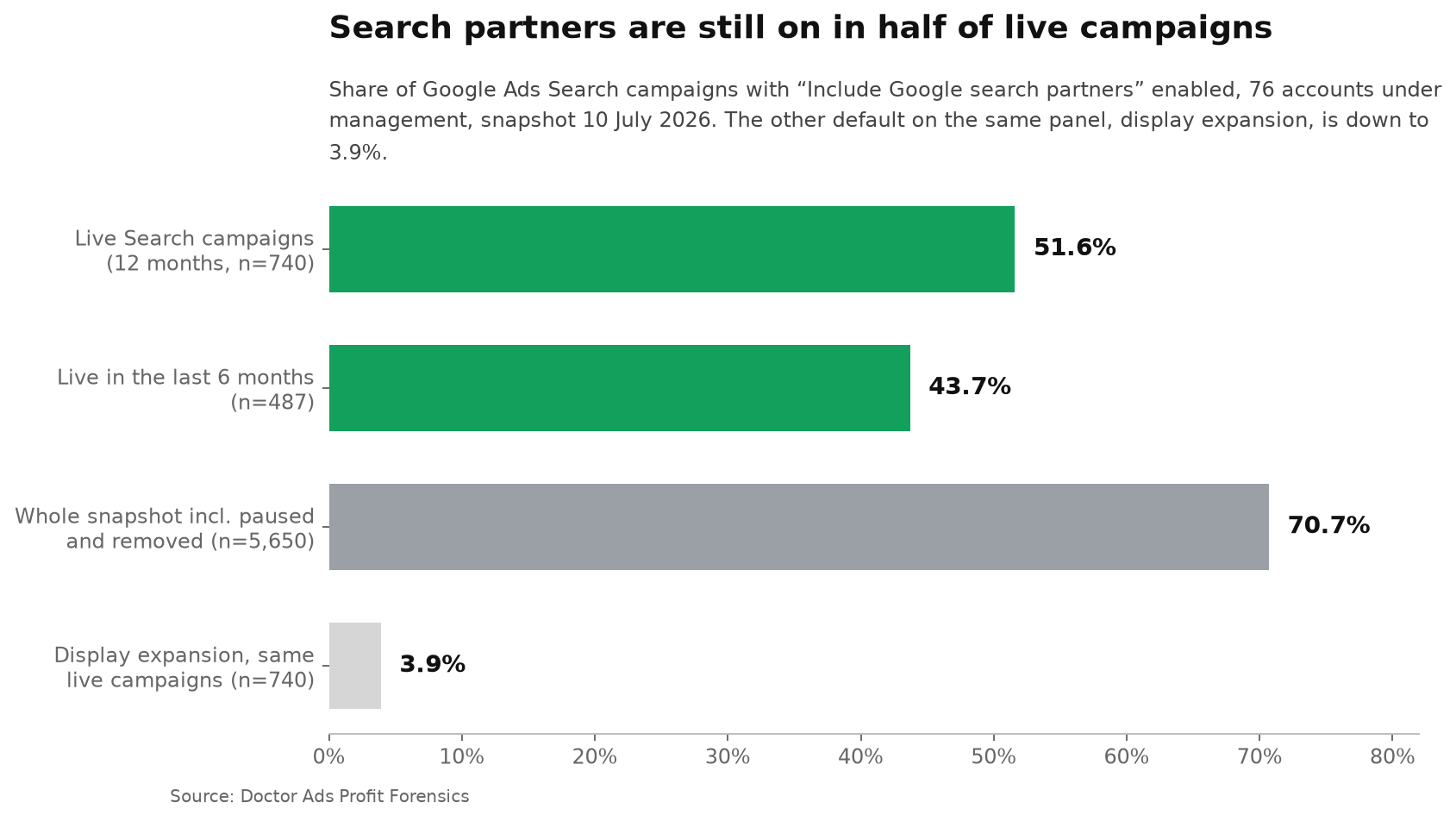
51.6%