

Your sitelink report lists entries under every campaign, and it feels like a well-stocked account. In the median account with at least two enabled Search campaigns, 41.7% of those campaign attachments were sitelinks already attached to another campaign. At that median rate, 12 attachments would mean about 5 repeats and just 7 different sitelinks.
That matters the day someone edits a shared sitelink: Google applies the change everywhere it is attached, so a quick fix for one campaign lands in every campaign that shares it. Sharing is fine; the risk sits in the edit.
This is Links Are Not Assets: linking a sitelink to one more campaign adds a row to your report, not a new asset. Count the different sitelinks, and check where each one sits before you change it.
Your sitelink report counts attachments, not sitelinks
Twelve rows in a sitelink report can mean twelve different sitelinks or one sitelink attached to twelve campaigns. Google’s own developer example shows why: it creates the sitelink once, then attaches it to a campaign.
We counted both, and the gap is large: in the median account with at least two enabled Search campaigns, 41.7% of enabled campaign attachments repeated a sitelink already attached to another campaign. Put the other way, the different sitelinks numbered a median 58.3% of the attachments: seven sitelinks behind every twelve rows.
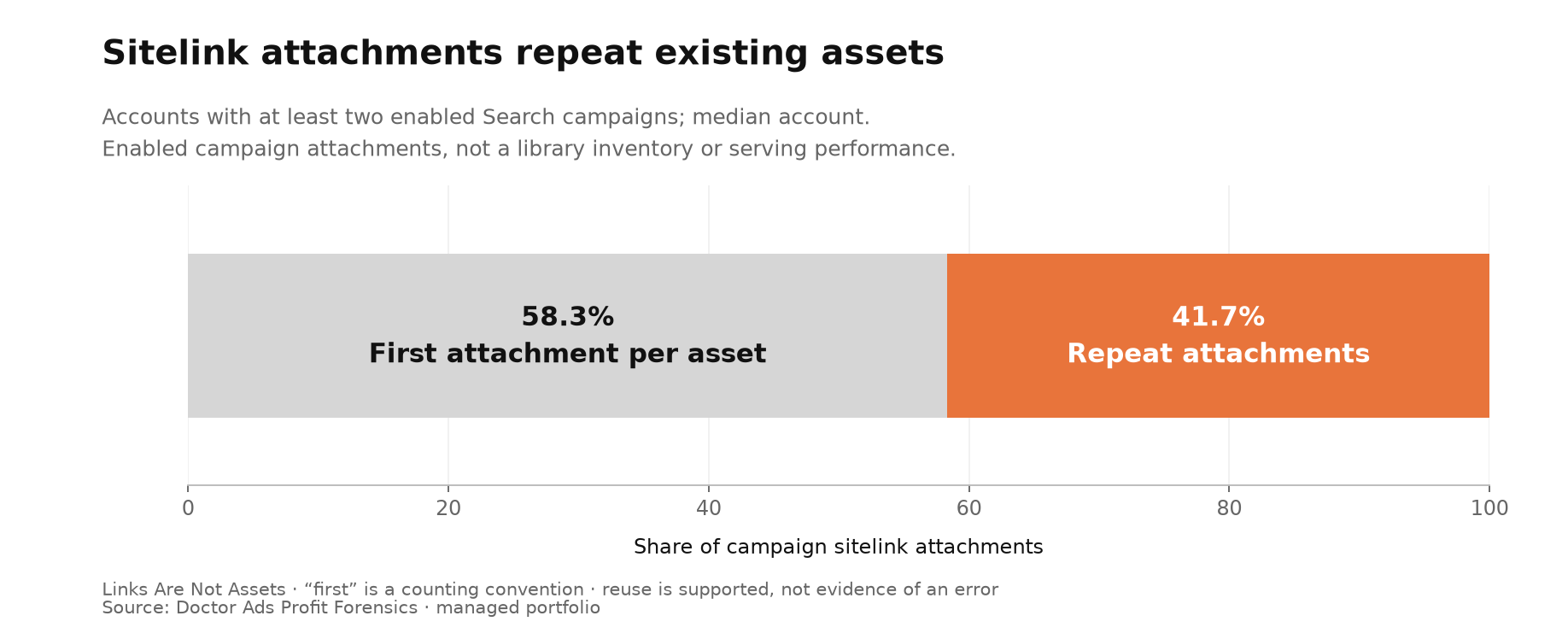
Pooled across all accounts, the repeat share is 65.0%, but that pooled figure leans on the busiest accounts: one account alone holds about a quarter of the extra attachments. The 41.7% headline is the account median, the typical account.
A quick fix in one campaign can change the others
Google says it plainly in its sitelink guidance: any change you make also applies to every ad group, campaign or account that shares the sitelink. So a repeat is not an idle row. It is a place where an edit made somewhere else will land.
The risk hides in routine fixes. One campaign needs a sharper pricing link, so someone opens it and rewrites the text and landing page. If that sitelink is shared, the new version applies in every campaign that carries it, including ones nobody opened.
None of this makes sharing a mistake. Google’s asset library exists so you can reuse assets, and one well-kept contact link across many campaigns is often the sensible setup. What matters is knowing a sitelink’s reach before you change it.
When this does not apply
You run a single Search campaign. With one campaign, nothing can repeat across campaigns. The finding covers accounts with at least two enabled Search campaigns.
Your sitelinks live at account level. Google says account-level sitelinks may appear in all eligible campaigns, and our campaign count does not see them. A campaign with few attached sitelinks may have more available.
You are hunting for copies with the same wording. Two sitelinks created separately with identical text count here as two different sitelinks. Compare text and landing pages on their own; that is a separate clean-up.
What to check in your account
- List your sitelinks with the campaigns each one is attached to, and note account-level sitelinks separately.
- Count the rows, then the different sitelinks. The gap is the number of repeat attachments.
- For each sitelink in more than one campaign, note every campaign it reaches: that is the reach of any edit.
- Before you change a shared sitelink for one campaign, decide whether the change should reach all of them. If not, create a separate sitelink for that campaign instead.
Researcher’s take
I like shared sitelinks. One well-kept pricing link beats a dozen copies drifting apart. What worries me is the hurried edit: from inside one campaign, a shared sitelink can look like that campaign’s own link, and whoever fixes it may never see the other campaigns it changes.
My rule is short. Before you edit a sitelink, find every campaign it sits in. A number that is easy to count still needs a clear meaning, which is why I also separate platform indicators from observed outcomes. Count sitelinks, not rows.
Igor Ivitskiy, Doctor Ads Profit Forensics
FAQ
Why does the same sitelink appear in several campaigns?
Because one sitelink can be attached to many campaigns, and Google allows it. In the median account with at least two enabled Search campaigns, 41.7% of campaign sitelink attachments were repeats, about 5 in every 12.
How many different sitelinks do I actually have?
The 58.3% in this study is the share of campaign attachments that are different sitelinks; it is not an inventory of your sitelinks. In the median account, the different sitelinks numbered 58.3% of the attachments, about 7 in every 12.
Your library can be larger. In the same accounts, about half of all saved sitelinks (52.9%) had no campaign attachment at all, and more than one in four (28.1%) in the median account. Account-level and ad-group attachments are not in this export, so these sitelinks may still be in use there; they are unattached to campaigns, not missing.
Does a high repeat share mean my sitelinks are poor?
No. The 41.7% describes how sitelinks are attached, not whether they show, get clicked or bring sales. Judge those by results in each campaign; our Ad Strength analysis shows why a platform label is not a result.
Method
Source: a 10 July 2026 snapshot of the managed portfolio, with one account refreshed in September 2026; no account appears in both exports. The cohort: accounts with at least two enabled Search campaigns and an enabled sitelink attachment in them (accounts: n = 41). An attachment is what Google calls a campaign asset association; we count each enabled one once, then the different sitelink assets behind them by asset ID.
Repeat share is (attachments minus different sitelinks) divided by attachments, per account; which attachment counts as “first” is a counting convention, not the order of creation. The cohort holds 1,567 attachments, 549 different sitelinks and 1,018 repeats (pooled 65.0%), 265 of them in one account.
Leaving out one account at a time keeps the median between 37.5% and 44.2%; without the largest account by spend it is 37.5%, and one account per group of related accounts gives 44.2%. Without the two-campaign condition the median is 0%.
The library count covers the same accounts: 2,524 of 4,769 sitelink assets with link text had no campaign attachment of any status or campaign type. Across the whole export, all 3,700 campaign sitelink references matched a saved asset.
Limits: a managed and audited portfolio, not a random sample of advertisers; one snapshot, with no trend; campaign attachments only, without account-level or ad-group ones; serving, results and duplicate wording are not measured. No client, niche or country is identified.


